
Troubleshooting
Alexa routine not running correctly?
First test the routine directly in Alexa, then test the saved command inside Buttons for Alexa. If Alexa works but Buttons for Alexa does not, check the exact trigger phrase, Alexa account connection and the routine’s response/output device.
1. Confirm the Alexa routine itself still works
Run the routine through Alexa using the same phrase you saved in Buttons for Alexa. If Alexa itself cannot run it, fix the routine or smart-home device in Alexa first.
2. Check the command saved in Buttons for Alexa
The saved audio command should match the phrase you normally use. You do not need to include the initial Alexa wake word.
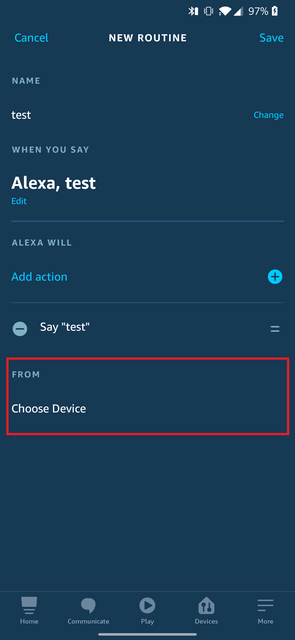
3. Check the routine response/output device
A routine whose response output is forced to the Alexa phone / “This device” can fail in some setups. If that happens, use the default option such as the device you speak to or select a real Echo device. If your current setting already uses the default and the routine still fails, test the opposite output choice.
4. If every routine fails, reconnect Alexa
Open Buttons for Alexa settings and redo the Alexa login/account connection. If the account state cannot be recovered, uninstall/reinstall can be used as a final full reconfiguration step.
5. If only the widget fails
If the same saved routine works when launched from inside Buttons for Alexa, see the widget troubleshooting steps. The problem is then more likely related to the launcher or Android background restrictions than the Alexa routine.