
PRO feature
Create an on/off Alexa routine widget
Buttons for Alexa can pair two complementary commands behind one on/off widget. Configure the “on” command first, enable the on/off option, record the corresponding “off” command and then add the widget to Android.
1. Enable the on/off command
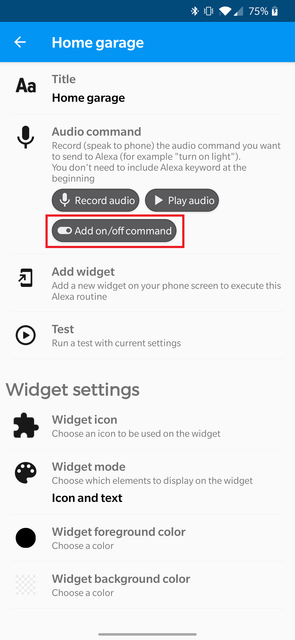
Create or edit the routine you want to use as the first state, then enable Add on/off command.
2. Record the second state
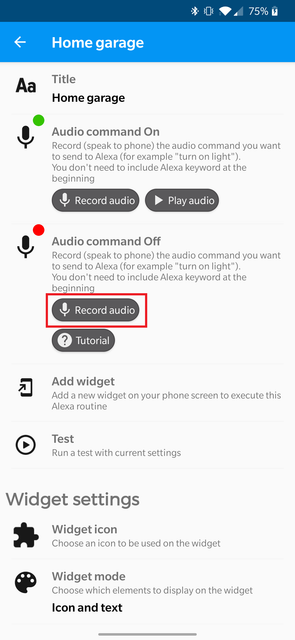
Record the opposite command. For example, if the first command is “open garage”, the second can be “close garage”.
3. Add and test the widget
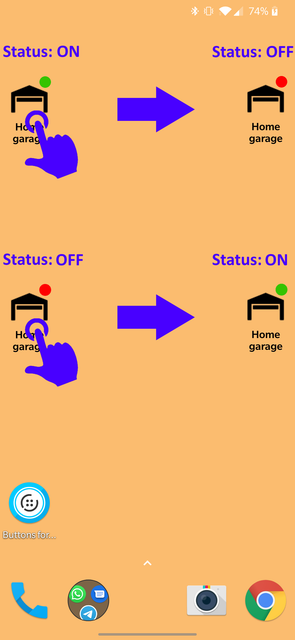
Add the widget to the Android home screen. Each tap switches to the other configured command/state.
State is a control convenience, not device telemetry
The widget state represents the command sequence managed by Buttons for Alexa. Do not assume it is a real-time sensor reading of the physical device unless your specific workflow explicitly provides that feedback.